


iOS 14 is the biggest iOS update of 2020. Apple has added a lot of new improvements to the OS for iPhones. For instance, the home screen gets a makeover, and you no longer get a full-screen notification when you receive a call, but instead, a handy pop-up. We list the most important changes for you.
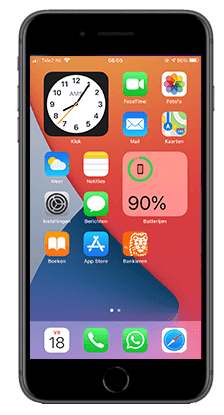

1. Widgets
Apple is known for its home screen that cannot be customized. For a few years now, it has been possible to add handy widgets to an info screen when you swipe left. It is now possible to place these widgets among your app icons. Unsure between two widgets for one spot? You can easily stack them, allowing you to swipe through them. Handy, right?2. App Library
Anyone who has ever worked with an Android device knows this feature: the application library. By swiping all the way to the right in iOS 14, you get a handy overview of all apps with a convenient search bar. This way, you can quickly find the app you're looking for without having to scroll through five tabs. For everyone who uses many apps on their iPhone, this is an ideal addition.3. Call and Siri pop-ups
You know the situation, you're in the middle of writing an email or typing a message on WhatsApp, and you get a call. Immediately, everything on your screen disappears. Not exactly up to date in this era where we multitask all day, right? In iOS 14, the full-screen disappears when you receive a call. Instead, you only get a handy pop-up at the top of your screen. You can answer or swipe up to ignore the call. Siri also no longer appears in full screen but as a small bubble at the bottom of your screen.