


Updated on 13 November 2026
The short answer
- QWERTY is the standard in the Netherlands: the top letter row starts with Q-W-E-R-T-Y.
- AZERTY is the standard in Belgium and France: A and Q, and Z and W are swapped, M sits next to L and you type numbers with Shift.
- Choose the keyboard you're used to; switching takes most people a few weeks.
At iUsed.com, we offer MacBooks with different keyboard layouts: Qwerty Dutch, Qwerty International, and Azerty. In this blog, we will discuss the differences between these keyboards.
Qwerty Dutch
The keyboard commonly used in the Netherlands is Qwerty Dutch; see the image below. This type is mainly recognizable by a vertical Enter/Return key. Additionally, the Backslash (\) is located below the Enter/Return key, and there is a smaller Shift key with a tilde/grave accent key (`) next to it. The Dutch keyboard also has a euro symbol on the 2 key. To use this, you need to press the key combination Alt + 2.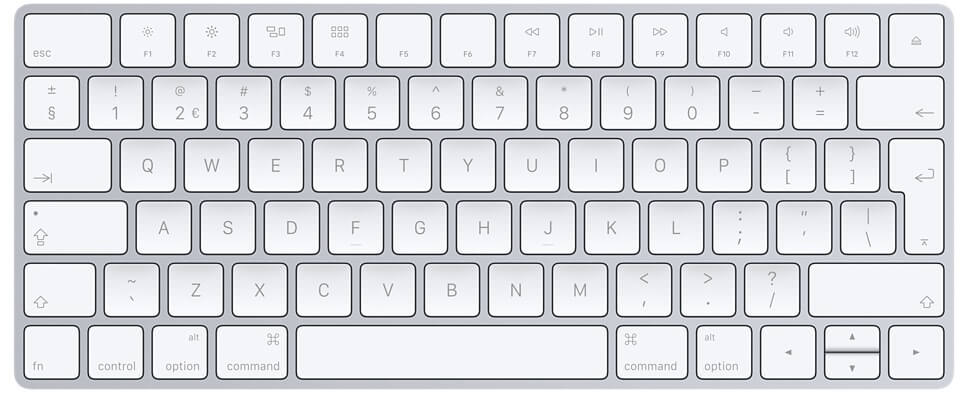
Qwerty International
Another common keyboard type in the Netherlands is Qwerty International; see the image below. The main difference is that this type has a horizontal Enter/Return key. Additionally, it has a wider Shift key, and the Backslash is located above the Enter key. The tilde/grave accent key (`) is next to the 1, and the euro symbol is missing on the 2. However, when you set the location to the Netherlands, you can still use the key combination Alt + 2 for the euro symbol.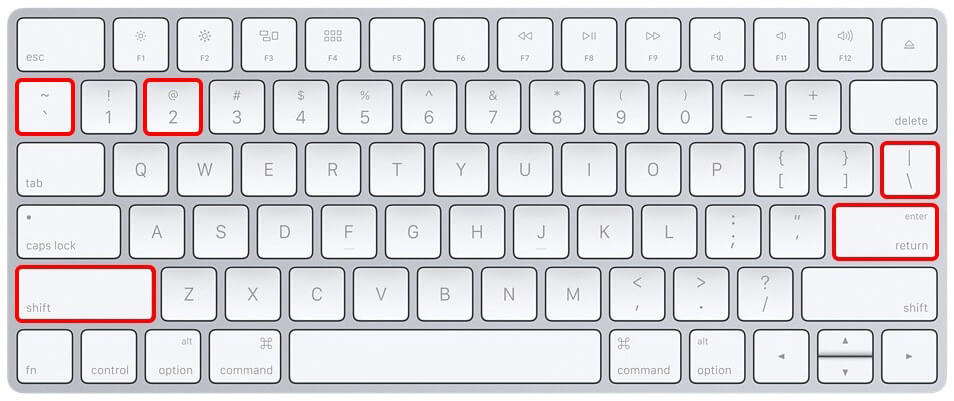
Azerty
The keyboard used in Belgium is Azerty; see the image below. This type differs in several ways from the Dutch version. First, the Q and A keys are swapped, and the M key has moved up a row. Additionally, the W and Z are also swapped. Special characters like the exclamation point, question mark, and euro symbol are located in different places.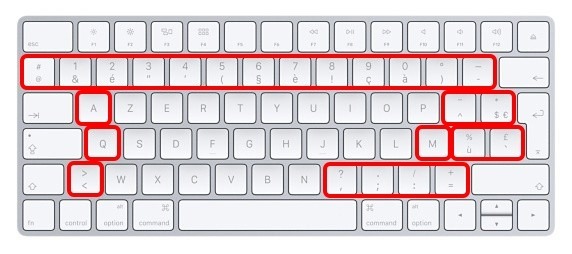
A MacBook with the right keyboard
At iUsed you'll find refurbished MacBooks with a QWERTY keyboard, and a separate selection with AZERTY (Belgian) keyboards.
Frequently asked questions
Can I use an AZERTY MacBook as QWERTY?
Yes, in software. Choose a QWERTY layout in System Settings > Keyboard > Input Sources. The printed keys stay AZERTY.